PypeRunner Components
PypeRunner has three main building blocks:
Taskdefine the work unitsPipelinedefines the order in which the tasks are executedRunnerorchestrates the execution of tasks in a pipeline
Task
A task is the
Task Name
The name of a task consists of its class name and an optional tag in the form of <class-name>(<tag>). As the name of each task in a pipeline must be unique, the tag can be used to use multiple instances of the same task in a pipeline.
@task('simple-task')
def simpletask(data):
    return 'simple-task'

first_task = simpletask(tag='first')
second_task = simpletask(tag='second')

print(first_task.name)
# returns 'simple-task(first)'
print(second_task.name)
# return 'simple-task(sceond)'
Task Parameter
A task that receives data from an upstream task (i.e. all tasks that are not at the root / start of a pipeline) needs to accept a data parameter, in which the upstream tasks’ results will be provided to the task. The input data is provided in a list, where each element of the list contains the result of one upstream task. For example, if a task has three upstream (parent) tasks, then the data argument to the task’s function will contain three items, one from each upstream task. Please note that the order of elements in data is not guaranteed and the upstream tasks need to supply identifying information in their result on their own, should that be required to process their outputs in the downstream child task.
A task can have additional parameters. These need to be defined as the task’s function (either in the function’s
definition, if defining the task by a function, or in run(), if defining a task as a class)
and need to be specified during task creation time.
Additionally
Task Hash
The task hash is an unique identifier of a task that takes into account both the task’s parameter and the task’s
environment in the pipeline (specifically: ALL upstream tasks). It is computed using the
hash() method.
The hash is constructed from the hash of the specific task and the hashes of all parent
(predecessor) tasks. It is therefore dependent on the pipeline the task is part of. This is used to precisely
identify a task in a given context (e.g. when saving and loading pipelines using the
pyperunner.Pipeline.to_file() and pyperunner.Pipeline.from_file() methods to store/load a
pipeline from file). It ensures reproducibility of single pipeline runs.
Memory consumption
Note that pyperunner executes each task in a separate process (using the python library multiprocessing) and receives the results using a multiprocessing.Queue. Thus, memory consumption may be more than twice the size of actual task return value as it must be stored both in the task and in the main process that receives the data.
Define Tasks
Tasks can be defined either from functions or by subclassing the Task class,
Which way to use depends on the complexity and organization of the task’s code: For a simple
workflow a function usually suffices and is easier readable, while for complex workflows with
multiple function calls and the requirement to keep a state, a class might be the better choice.
Function as task
To use a user-defined function as a task, simply tag it with the task() decorator:
from pyperunner import task

@task("MyTask")
def my_function(data):
    result = do_something(data)
    return result

# note that creating the task is performed by calling the function
# but *without* the data argument.
my_task = my_function()
The task() decorator has a required positional parameter name, which is used as the name of the
task. It is required that each task in pipeline has a unique name.
The function that is decorated by the task() decorator needs to either accept a named parameter
data or the task() decorator needs to be supplied a receives_input=False parameter.
# Create a task named "SimpleTask" - note that the function accepts
# the `data` keyword parameter
@task('SimpleTaskWithInput')
def simpletask_with_input(data):
    return 'simple-task'

# If the function should not accept data (i.e. be a starting task of the pipeline),
# the `receives_input=False` parameter must be supplied to the task() decorator.
@task('SimpleTaskWithoutInput', receives_input=False)
def simpletask_without_input():
    return 'simple-task'

# The following definition will raise an AttributeError
@task('SimpleTaskError')
def simpletask_without_input_error():
    return 'simple-task'
# raises AttributeError: To receive input data, the function must accept
# the named parameter "data"
You can add additional parameters to the function definition. These then need to be supplied during task creation time:
@task("MyTaskWithParameters")
def my_function(data, reduce, n_iterations=10):
    result = data
    for i in range(n_iterations):
        result = do_something(result, reduce=reduce)

    return result

# The task is created by calling the function but always *without*
# the `data` argument.
my_task = my_function(reduce=True, n_iterations=20)

# Parameters with default values may be skipped during task creation
my_task = my_function(reduce=True)
Class as task
To use a class as a task, the class must inherit from the Task class, implement the abstract
run() function and use the run() decorator on the run() implementation:
from pyperunner import Task, run

class Hello(Task):
    @run
    def run(self, data):
        return "Hello"


# Note that creating the task is performed by instantiating the class:
my_task = Hello()
You can add additional parameters to the run() method definition. These then need to be supplied during task creation time:
@task("MyTaskWithParameters")
class SomeWorker(Task):
    @run
    def run(self, data, reduce, n_iterations=10):
        result = data
        for i in range(n_iterations):
            result = do_something(result, reduce=reduce)

        return result

# The task is created by instantiating the class using the additional
# parameters from the run function as parameters to the constructor
# but always *without* the `data` argument.
my_task = SomeWorker(reduce=True, n_iterations=20)

# Parameters with default values may be skipped during task creation
my_task = SomeWorker(reduce=True)
Combine Tasks to Pipeline
Standard Pipeline
A Pipeline describes the connections between tasks. Create a pipeline using:
from pyperunner import Pipeline

pipeline = Pipeline("my-pipeline")
Pyperunner offers a functional API to connect tasks and to add them to a pipeline:
@task('simple-task')
def simpletask(data):
    return 'simple-task'

# Reusing the same task using the "tag" parameter
first_task = simpletask(tag='first')
second_task = simpletask(tag='second')
third_task = simpletask(tag='third')
fourth_task = simpletask(tag='fourth')

# connect tasks from first to fourth task
fourth_task(third_task(second_task(first_task)))

# and add the starting task to the pipeline
pipeline.add(first_task)
Sequential Pipeline
A Sequential pipeline is a wrapper for purely sequential (path) workflows. With sequential
pipelines, you can supply the whole pipeline as a list to the constructor. The tasks are automatically connected in
the supplied order and applied
@task('simple-task')
def simpletask(data):
    return 'simple-task'

# Reusing the same task using the "tag" parameter
first_task = simpletask(tag='first')
second_task = simpletask(tag='second')
third_task = simpletask(tag='third')
fourth_task = simpletask(tag='fourth')

# create a sequential pipeline and supply whole pipeline as list in constructor
pipeline = Sequential("sequential", [first_task, second_task, third_task, fourth_task])
Pipeline summary
Pyperunner offers two modes of visualizing the pipeline: As ASCII and as PNG:
# create pipeline and add tasks
# ...

# print an ASCII summary
pipeline.summary()
This outputs an ASCII summary like this to the console:
                                                 +---------------+
                                                  | LoadData(csv) |
                                                  +---------------+
                                                          *
                                                          *
                                                          *
    +--------------------+                  +---------------------------+
    | LoadData(database) |                  | ProcessData(normalize-l1) |
    +--------------------+                  +---------------------------+
              *                                           *
              *                                           *
              *                                           *
+---------------------------+                 +----------------------+
| ProcessData(normalize-l2) |                 | AugmentData(augment) |
+---------------------------+                 +----------------------+
                        ****                  ***
                            ****          ****
                                **      **
                           +----------------+
                           | Evaluate(both) |
                           +----------------+
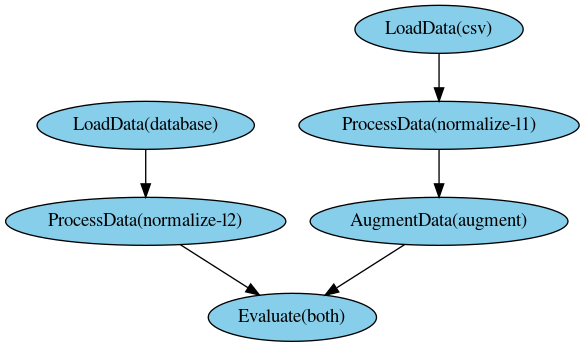
The PNG image of the pipeline is created by the Runner, because it contains color-coded
information about the pipeline run
# Run pipeline
runner = Runner(data_path="data/", log_path="log/")
runner.run(pipeline)

runner.write_status_image("status.img")
This outputs an image like this:
Save & load pipelines
At each run, information about the pipeline is automatically saved to the log path as pipeline.yaml. To manually
save a pipeline, call the to_file() function of the pipeline
pipeline.to_file('my-pipeline.yml')
To load and fully reconstruct a previously saved pipeline, use the from_file() method:
from pyperunner import Pipeline, Runner

pipeline = Pipeline.from_file('my-pipeline.yml')

# re-run loaded pipeline
runner = Runner(data_path='data/', log_path='log/')
runner.run(pipeline)
Note
To reconstruct a pipeline from yaml file, you must make sure that all Tasks used by the pipeline are
defined/imported when calling from_file() and that the defined Tasks use the exact
same modules and names as saved in the pipeline.
This is because the pipeline tasks and their modules are stored as strings in the yaml file and only reconstructed
from their names.
Run Pipeline
To run a pipeline, instantiate a Runner and run the pipeline. You need to specify the
data and log paths for the runner, where data_path is the path where all outputs of the tasks are stored and
log_path is the path where log file from the actual pipeline run, along the pipeline definition as a yaml file, are
stored.
runner = Runner(data_path='data/', log_path='log/')
runner.run(pipeline)
Access pipeline results
You have three options to access the pipeline results:
1. Using the results() function after a pipeline run
2. Using the pyperunner.PipelineResult.from_file() function on a stored pipeline run yaml file
3. Manually from the file system using joblib.load
pipeline.results
After a pipeline run, you can access the results using results() on the pipeline:
runner = Runner(data_path='data/', log_path='log/')
runner.run(pipeline)

list(pipeline.results())

# outputs, for example:
# [
#   'AugmentData(augment)',
#   'Evaluate(both)',
#   'LoadData(csv)',
#   'LoadData(database)',
#   'ProcessData(normalize-l1)',
#   'ProcessData(normalize-l2)'
# ]
You can access the results from individual tasks using the task name as the key to the pyperunner.PipelineResult() object:
for task_name in pipeline.results():
    print(pipeline[task_name])
PipelineResult
To access the results of a pipeline at a later timepoint, use the pyperunner.PipelineResult.from_file()
function on a stored pipeline run yaml file.
runner = Runner(data_path='data/', log_path='log/')
runner.run(pipeline)
Example output:
2021-01-23 17:23:18 INFO MainProcess root Stored pipeline parameters in /home/glichtner/projects/pyperunner/log/my-pipeline_210123T172317/pipeline.yaml
Load the pipeline results:
from pyperunner import PipelineResult
fname = "/home/glichtner/projects/pyperunner/log/my-pipeline_210123T172317/pipeline.yaml"

results = PipelineResult.from_file(fname)

# loop through individual task results
for task_name in pipeline.results():
    print(pipeline[task_name])
Filesystem
The outputs of tasks are dumped to the local filesystem using joblib.dump(). To load the output of a single task manually, use joblib.load():
import joblib
fname = "/home/glichtner/projects/pyperunner/data/Evaluate(both)/197f82a6dbc9799406a35bef412cd7f4/result.dump.gz"

task_result = joblib.load(fname)
Reproducibility
To ensure reproducibility, alongside the results of each task result, pyperunner stores the paramters used for that task and also a hash of the parent/upstream tasks of that task.
Result Caching
Pyperunner caches the outputs of a task and only executes a task if
The task hasn’t been executed yet and there are no results available
The task is forced to be executed by specifying reload=True during task creation
All tasks are forced to be executed by using force_reload=True when calling
pyperunner.Runner.run()Different parameters are used when instantiating the task
Any task upstream to the task in question has changed or is required to reload
Examples
Consider the following Sequential pipeline of four tasks:
@task('simple-task')
def simpletask(data, param):
    return 'simple-task'

# Reusing the same task using the "tag" parameter
first_task = simpletask(tag='first', param=1)
second_task = simpletask(tag='second', param=2)
third_task = simpletask(tag='third', param=3)
fourth_task = simpletask(tag='fourth', param=4)

# create a sequential pipeline and supply whole pipeline as list in constructor
pipeline = Sequential("sequential", [first_task, second_task, third_task, fourth_task])

runner = Runner(data_path='data/', log_path='log/')
runner.run(pipeline)
If these task haven’t run before in the specified data_path, all 4 tasks are executed. If running the pipeline directly again, no task will be executed, as all results have been cached in data_path and nothing has changed:
runner.run(pipeline) # no task executed, all cached
If a task is recreated using the reload paramter, that task and all subsequent tasks are executed:
third_task = simpletask(tag='third', param=3, reload=True)

# create a sequential pipeline and supply whole pipeline as list in constructor
pipeline = Sequential("sequential", [first_task, second_task, third_task, fourth_task])

runner.run(pipeline) # executes task 3 (because of reload=True) and 4 (because its upstream task changed)
All tasks can be executed by using the force_reload parameter on the runner:
# create a sequential pipeline and supply whole pipeline as list in constructor
pipeline = Sequential("sequential", [first_task, second_task, third_task, fourth_task])

runner.run(pipeline, force_reload=True) # executes all tasks
If any parameter of task is changed (and the task hasn’t been executed using that parameter configuration), then also that task and all dependent (downstream) tasks are executed:
# Reusing the same task using the "tag" parameter
first_task = simpletask(tag='first', param=1)
second_task = simpletask(tag='second', param='CHANGED') # this task uses a different parameter value
third_task = simpletask(tag='third', param=3)
fourth_task = simpletask(tag='fourth', param=4)

# create a sequential pipeline and supply whole pipeline as list in constructor
pipeline = Sequential("sequential", [first_task, second_task, third_task, fourth_task])

runner.run(pipeline) # Executes task 2 (because of the changed parameter) and tasks 3 and 4
                     # (because an upstream task is executed)